Android export methods
Godot supports two distinct approaches for exporting an Android build: Legacy and Gradle.
ShipThis defaults to the Gradle export method unless your export_presets.cfg explicitly says otherwise.
Legacy
The Legacy export method is designed for quickly testing your game on a device. Godot takes an existing Android export template APK, injects your game data, and signs it with your keystore.
This method does not produce a Gradle project and does not use Godot's modern Android build system.
Legacy builds support APK only.
Google Play now requires AAB uploads, which means developers targeting the Play Store must use the Gradle build pipeline. See Google's announcement here.
Gradle (Modern Godot Android Build Pipeline)
The Gradle export method must be used if you want to publish your game in AAB format to the Google Play store.
It can be enabled in the "Project > Export" dialog.
On older versions of Godot this export method is called a "Custom Build".
| Godot 3.X | Godot 4.X |
|---|---|
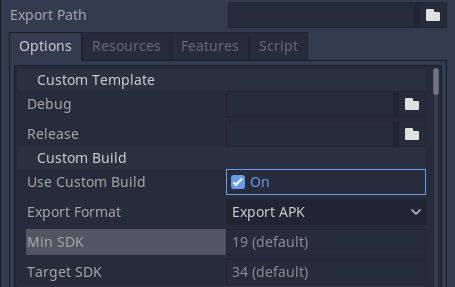 | 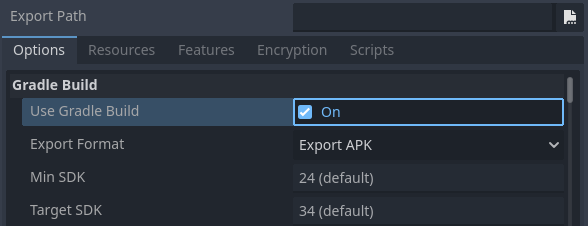 |
What the Gradle method actually does
When Gradle build is enabled, Godot will install an Android build template, this usually lives within an android folder within your project directory. This build template includes:
build.gradleand related Gradle configurationAndroidManifest.xml- Java/Kotlin stub files and the generated Godot engine libraries
This allows:
- plugin and SDK support (AdMob, Play Games, Firebase, billing, etc.)
- generating both APK and AAB
- reproducible CI/CD builds
- optionally opening the Gradle project in Android Studio for debugging or extension
Summary
ShipThis uses a Gradle build for Android by default, meaning your Godot game is immediately available in APK and AAB format.
| Legacy | Gradle | |
|---|---|---|
| Plugin Support | ⚠️ Very limited | ✅ Full support |
| Output Format - APK | ✅ Supported | ✅ Supported |
| Output Format - AAB | ❌ Not supported | ✅ Supported |
| Enabled by ShipThis | ⚠️ Yes, but only if explicitly configured in export preset | ✅ Yes (default) |
How ShipThis Exports Godot Android Games
ShipThis is a cloud build system designed for Godot developers. When you submit an Android export, ShipThis:
- Reads your
export_presets.cfg - Uses the export method defined there (Legacy or Gradle)
- If no
export_presets.cfgis found, ShipThis creates one that defaults to Gradle - You do not need to install the Android build template
- If the
androidfolder is missing, the ShipThis build server will install it automatically from the Godot templates
- If the
- Runs the Godot Gradle build in a clean, reproducible environment and uploads the resulting APK & AAB to your build storage
FAQ
Can I export my Godot game as APK or AAB without a Google account?
Yes. The wizard command is designed to generate your own credentials for signing and publishing, but you might not need this when initially exporting your game.
You can create a ShipThis account, create the game and then run the ship command using demo credentials. Later, when you need to set up publishing, you can re-run the wizard command.
First create a ShipThis game
Export the game as APK
Export the game as AAB
Do I need an export_presets.cfg to export for Android?
No, the ShipThis build server will generate a valid export_presets.cfg for your game.
If you provide an export_presets.cfg file, the desired preset values will be merged with the generated file.
How do I debug a failed Android export?
If an export fails, rerun it with the --follow flag to view the logs in real time:
For additional debugging, you can include the --verbose flag - this enables detailed logging locally and on the build server, including running the Godot export with verbose output:
You can review logs at any time in the dashboard under the "Jobs" tab.
See the Troubleshooting Guide for common checks. If the issue persists, we can help you directly in our Discord.