Godot PCK encryption on Android and iOS
If you have shipped a Godot game, you have probably wondered how easy it is for someone to open it up. The honest answer is: very easy. Free tools like GDRE Tools take an exported game and give back the whole project, scripts and all.
Godot can encrypt the PCK, which stops that. But it needs custom export templates, and on Android and iOS there are a few extra steps that are not in one place in Godot's docs. This guide puts them together, says what encryption does not stop, and shows how ShipThis does it for you if you use it.
Gwizz's video shows the whole process for a Windows game, from getting the Godot source to exporting:
What PCK encryption is
When you export, Godot puts your game's files into a PCK (Godot's own pack format - see Exporting projects). On iOS the PCK is a file inside the app bundle. On Android, Godot stores each file separately in the APK or AAB's assets folder, with a small file that lists them. Encryption works the same way on both.
PCK encryption encrypts the files in the PCK with AES-256, using a 256-bit key you make, with an MD5 checksum for each file. The game needs the same key to read its own files, so the key has to be compiled into the game. That is why you have to compile your own export templates - the official templates cannot be used.
Godot's guide for this is Compiling with PCK encryption key. This guide follows it, with the extra steps for Android and iOS. The Android steps need Godot 4.5 or later and a Gradle build. On iOS any Godot 4 version works.
What it does and does not stop
Godot's guide says the key can be found:
Of course, the key needs to be stored in the binary, but if it's compiled, optimized and without symbols, it would take some effort to find it.
— Compiling with PCK encryption key, Godot docs
So encryption stops casual unpacking: someone opening your game in a tool like GDRE Tools and getting the project back. It will not stop a determined attacker who is willing to reverse engineer the game, because the key ships in the game, and there are public tools that search game binaries for it (see the FAQ).
Encrypted (if they match the include filters):
- scripts, scenes, resources, imported textures and audio
- the PCK's file list, if "Encrypt Index" is on
- C# code on Android, because the assemblies are stored with the game files (unless you use the NativeAOT option, which compiles them to a native library)
Not encrypted:
- the engine and the game executable
- GDExtension and plugin libraries
- platform files outside the PCK, such as the Android manifest, the Info.plist and icons
- C# code on iOS - it is compiled to native code and is not in the PCK
- save files - see the FAQ
What GDRE Tools sees
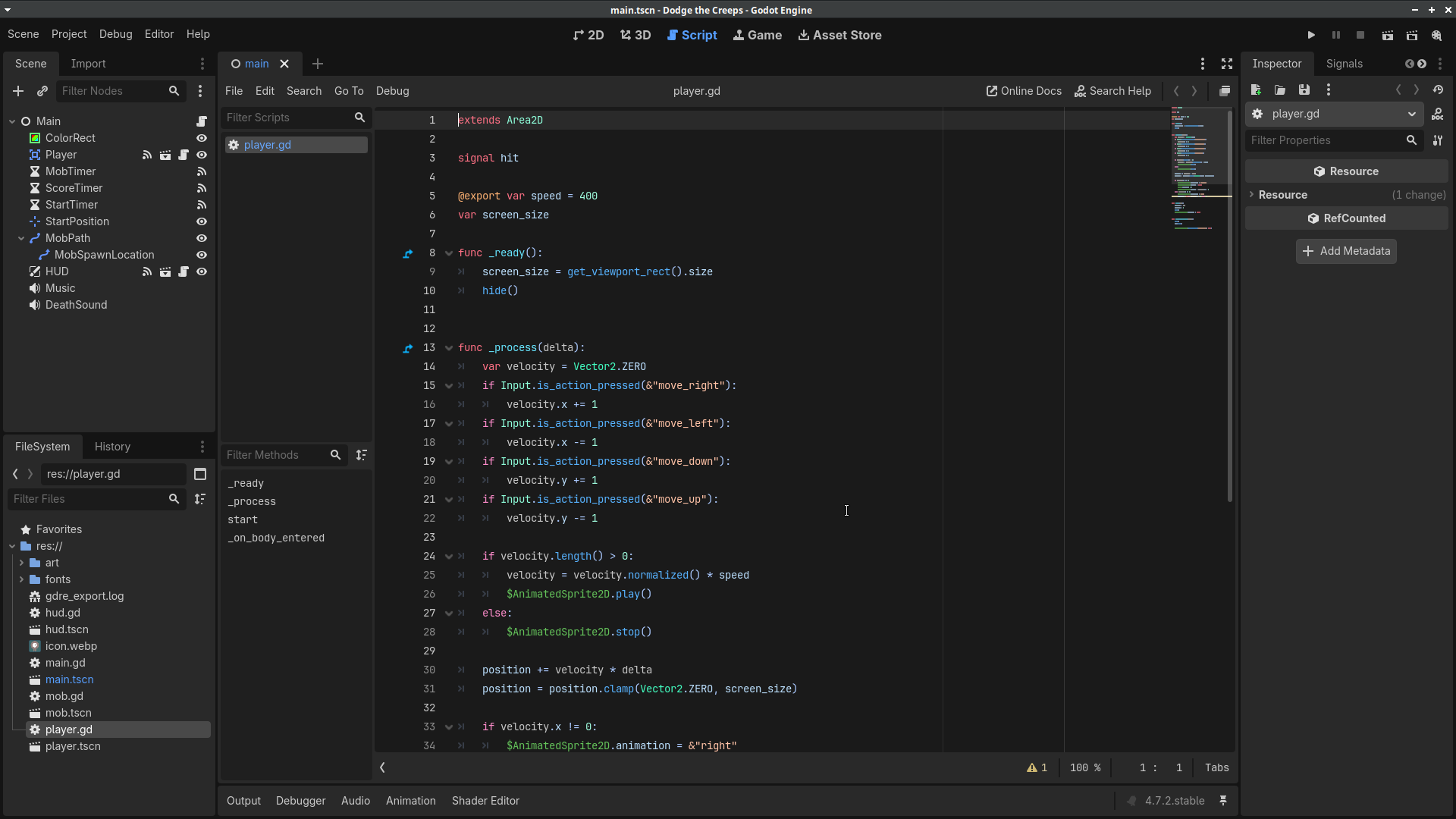
GDRE Tools is the usual tool for recovering a Godot project from an exported game. These screenshots use Godot's Dodge the Creeps demo, exported for Godot 4.7.2.
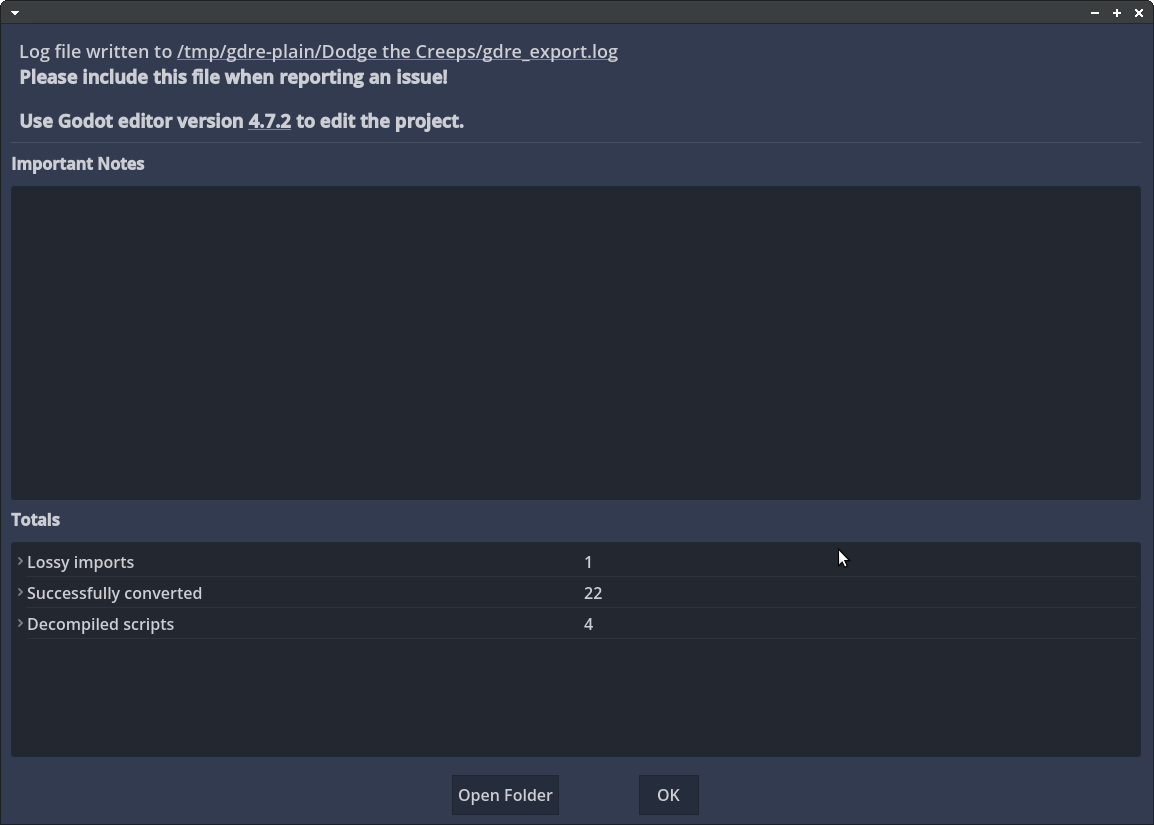
Without encryption
GDRE Tools recovers all the scenes and scripts:
The recovered project opens in the Godot editor, with the GDScript as it was written:
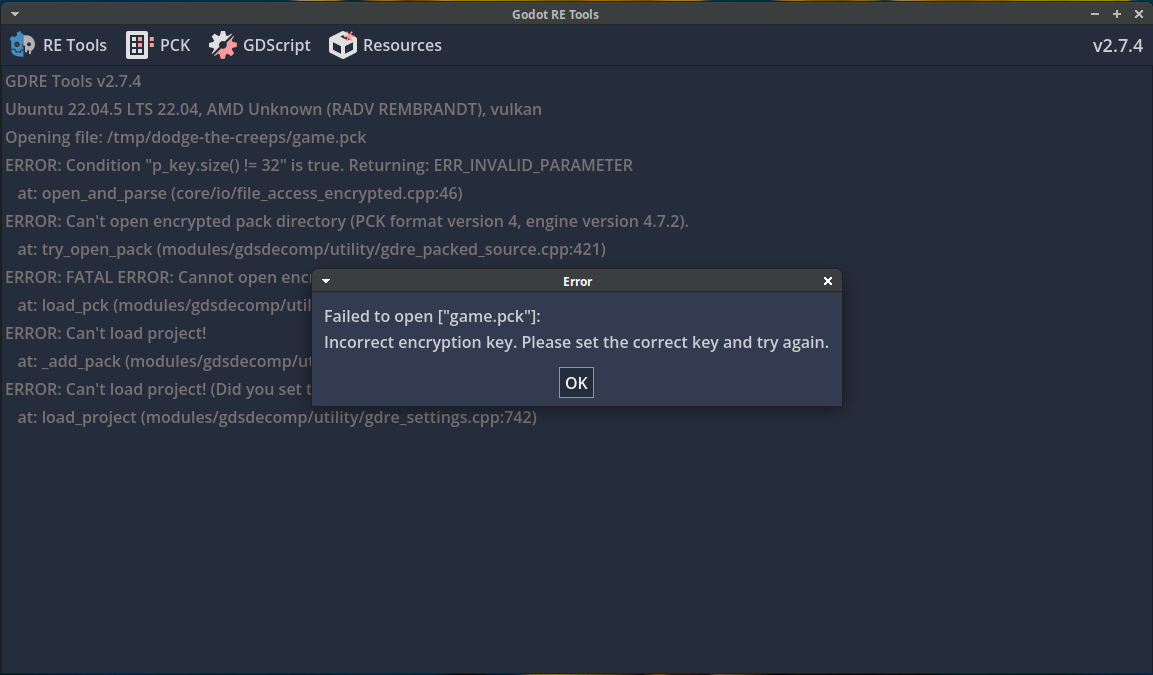
With encryption
The same game exported with encryption on gets nothing back without the key:
1. Make an encryption key
This gives 64 hex characters. You do not need a key generator website - this is the command Godot's guide uses. Keep the file out of git and somewhere you will not lose it. Patch and DLC packs have to use the same key as the game, so if you lose it you cannot make packs for builds that are already out.
2. Compile the export templates with the key
Get the Godot source for the exact version of your editor, for example the 4.7.2-stable tag. Godot's compiling guides list what to install: Python and SCons, plus the Android SDK and NDK for Android, or Xcode for iOS. Run the commands from the root of the source folder.
Set the key in the shell, then compile the templates as normal:
On Windows, use set SCRIPT_AES256_ENCRYPTION_KEY= followed by the key.
At the start of the build Godot prints this line. If you do not see it, the key is not in the template:
The variable is only set in that terminal, so compile every template from the same shell.
The steps below build release templates. If you also export debug builds (one-click deploy from the editor uses them), compile target=template_debug the same way.
Android
You need Godot 4.5 or later. Earlier versions do not encrypt the PCK in Gradle builds.
Follow Godot's Compiling for Android guide, with the key set.
1. Compile the release template for each architecture you ship. arm64 covers almost all current phones. Add arm32 for older devices and x86_64 for the emulator. x86_32 is rarely needed. Each one can take 15 minutes or more.
2. Package them into the Android source template. Gradle calls scons, so scons has to be on your PATH.
This makes bin/android_source.zip.
3. Point the export preset at it. In the Android preset, turn on Use Gradle Build and set Android Source Template to that zip.
4. Install the build template from Project → Install Android Build Template. If the project already has one from the official templates, the export fails with a version mismatch. Remove it from the same menu and install it again.
iOS
Follow Godot's Compiling for iOS guide, with the key set.
1. Get MoltenVK. Godot's iOS page asks for a static MoltenVK framework. The build copies it into the template, and without it the Xcode build of your game fails with:
If scons does not find MoltenVK on its own, add vulkan_sdk_path= with the path to it.
2. Compile the template. If you also want to run the game in the iOS Simulator, compile the simulator library first:
Then compile the device library and make the bundle:
This makes bin/godot_ios.zip.
3. Point the export preset at it. In the iOS preset, set Custom Template → Release to that zip.
3. Turn on encryption in the export preset
In Project → Export, select the preset and open the Encryption tab:
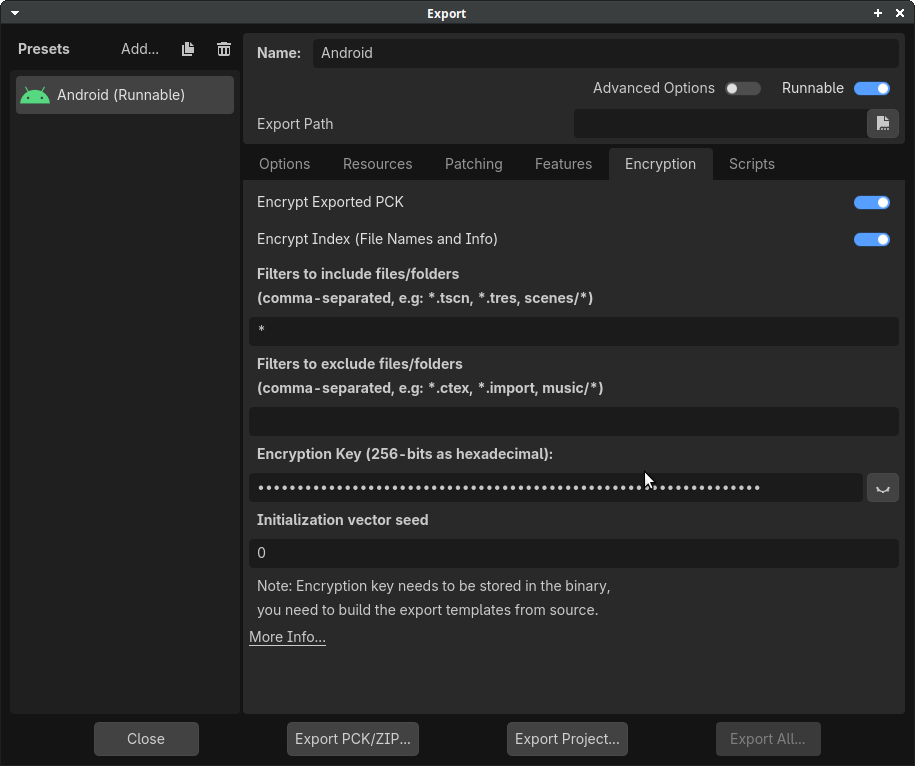
- Encrypt Exported PCK: on
- Encrypt Index: on
- Filters to include files/folders:
* - Encryption Key: the 64 characters from
godot.gdkey
Godot's guide says: "By default, include filters are empty and nothing will be encrypted." With only "Encrypt Index" on, the file list is hidden but the scripts, scenes, textures and sounds are still in the PCK unencrypted. Add * to encrypt everything.
Godot decrypts a whole file into memory when the game opens it. For long music tracks, which Godot normally streams from disk, this means the full file sits in RAM. If that is a problem, add those files to Filters to exclude files/folders (for example *.ogg) and they are left unencrypted.
Godot saves the key in .godot/export_credentials.cfg, so it stays out of git as long as the .godot folder is ignored. In Godot 4.0 it is saved in export_presets.cfg, which is often committed, so check before you push.
For command-line exports, set the key in GODOT_SCRIPT_ENCRYPTION_KEY. This is a different variable from the one in step 2: that one is read when the templates are compiled, and this one is read by the editor when it exports. Both need the same key.
4. Check the encryption worked
Run the game. If the template and the export do not have the same key, the game stops at startup. With Godot 4.7, adb logcat on Android shows the lines below, and on iOS the same errors are in the Xcode console:
Godot's guide quotes an older form of the same error: Condition "String::md5(md5.digest) != String::md5(md5d)" is true. Returning: ERR_FILE_CORRUPT. Both mean the key in the template and the key in the export preset are not the same.
If the game runs, open the exported APK or AAB (Android) or PCK (iOS) in GDRE Tools without the key. It should say the key is wrong and recover nothing.
GDRE Tools also refuses a PCK with only the index encrypted, so that check alone does not tell you the files are encrypted. Check the include filters in the preset.
In CI
Store the key as a secret. Pass it as SCRIPT_AES256_ENCRYPTION_KEY to the template build and as GODOT_SCRIPT_ENCRYPTION_KEY to the export. Compiling templates is slow, so compile them once for each Godot version and key, and cache them.
Without compiling templates
The pull request godot#115723 would let the editor write your key into the official templates at export time, with a button to make a random key. It is not merged yet (November 2026).
ShipThis builds Godot games for iOS and Android in the cloud and can encrypt the PCK for you. It makes a key for the game and stores it with your game on ShipThis, so every build uses the same one. You can export it at any time. It uses templates that already support encryption, so you do not compile anything:
shipthis game details turns encryption on for the game. shipthis game encryption status shows the fingerprint of the key, not the key itself:
Every build of the game is then encrypted. The include filter is * unless your preset already has its own filters. The build log shows:
- To ship one build without encryption:
shipthis game ship --no-useEncryption - To get the key for your own exports or patch packs:
shipthis game encryption export key.txt - It needs Godot 4.5 or later, and a Gradle build on Android (the ShipThis default).
The limit above still applies: the key is in the game. ShipThis builds of the same Godot version also share one template, with each game's key written into the same place. Once someone finds that place in one ShipThis game, it is the same in other ShipThis games on that Godot version. If that matters to you, compile your own templates as above. See the encryption docs for more.
FAQ
Is PCK encryption worth it for a Godot game?
It depends on what you want to stop. If you do not want your scripts and assets one click away from anyone with GDRE Tools, it is worth it, and once the templates are built it is one setting per export. If your game is open source, or you want people to mod it, leave it off - encryption makes modding harder too.
Does PCK encryption protect my Godot game's source code?
Partly. Without the key, tools like GDRE Tools cannot open the PCK, so your scripts and assets are not one click away. But the key is in the game, so someone who wants your code badly enough can get it out.
Does Godot obfuscate GDScript when it exports?
No. By default Godot 4 exports GDScript as compressed binary tokens, not as source text, but that is not obfuscation. GDRE Tools turns the tokens back into readable scripts - the screenshots above are from a default export. Encrypting the PCK is what stops that.
Can someone extract the encryption key from a Godot game?
Does PCK encryption stop someone re-uploading my game?
No. Someone can re-sign your whole APK and upload it without decrypting anything. Encryption makes it harder to take your scripts and assets for a reskin. For copies of the whole game, report them to the store: the App Store dispute form or Google Play's intellectual property policy.
Does PCK encryption stop people cloning my game?
Only one kind of clone. It stops someone unpacking your game and building their copy from your scripts, scenes and assets. It does not stop someone remaking the game from your trailer, screenshots or demo, which is how most clones are made, and with AI tools that is getting quicker. How To Market A Game has a good post on which games are easiest to clone and what to do about it.
If you put out a demo, it is a full Godot export, so without encryption anyone can open it in GDRE Tools the same way. Demos are mostly desktop builds - Gwizz's video at the top covers those.
Do I need to change ITSAppUsesNonExemptEncryption for iOS?
No. Godot's iOS export already sets ITSAppUsesNonExemptEncryption to false in the app's Info.plist, and PCK encryption does not change that.
Apple's encryption export page says encryption built into iOS is typically exempt and your own encryption typically is not, which is why people ask. But the US rules only cover encryption in items whose main purpose is information security, communications, networking or storing data (BIS encryption FAQ, Q.15). A game that encrypts its own files is not one of those. The question in App Store Connect is aimed at apps like messengers, VPNs and password managers.
If your game also has its own encryption for something else, like encrypted chat, check your answer again. This is not legal advice.
Does Godot PCK encryption encrypt save files?
No. The game writes saves at runtime, outside the PCK. To encrypt them, use FileAccess.open_encrypted_with_pass(). The password is in the game too, so this stops casual editing of saves, not someone determined.
Do patch and DLC packs need the same encryption key?
Yes. The key is in the template, so every encrypted PCK the game loads has to use the same key. If you change the key, builds made with the old key cannot load packs made with the new one.
Is Godot Secure better than PCK encryption?
Godot Secure changes the engine source so the common key tools do not find the key. You have to compile the editor as well as the templates. The key is still in the game's memory, so it makes the work harder but does not stop it. Alice GG's write-up goes through it.